
Structure
Whether each act carries its share of the book, and where the proportions work against the story.
Manuscript critique
A second opinion on the book as a whole, written in prose: where the structure sags, where the pacing stalls, where tension flattens. Every change stays yours to make.
Free trial. It includes enough credits to try the analysis on your own manuscript.
What it reads for
Each section names specific chapters and scenes, so a note points somewhere you can go.
Whether each act carries its share of the book, and where the proportions work against the story.
Where the book runs at one speed too long, and where a change of gear would land.
Flat runs, valleys and peaks, and whether the climax reads as an arrival.
How point of view, threads and stakes carry the reader from chapter to chapter.
Patterns in the prose across the whole manuscript, not one sentence at a time.
Add any section to My Actions in one click. Nothing is added unless you choose it.
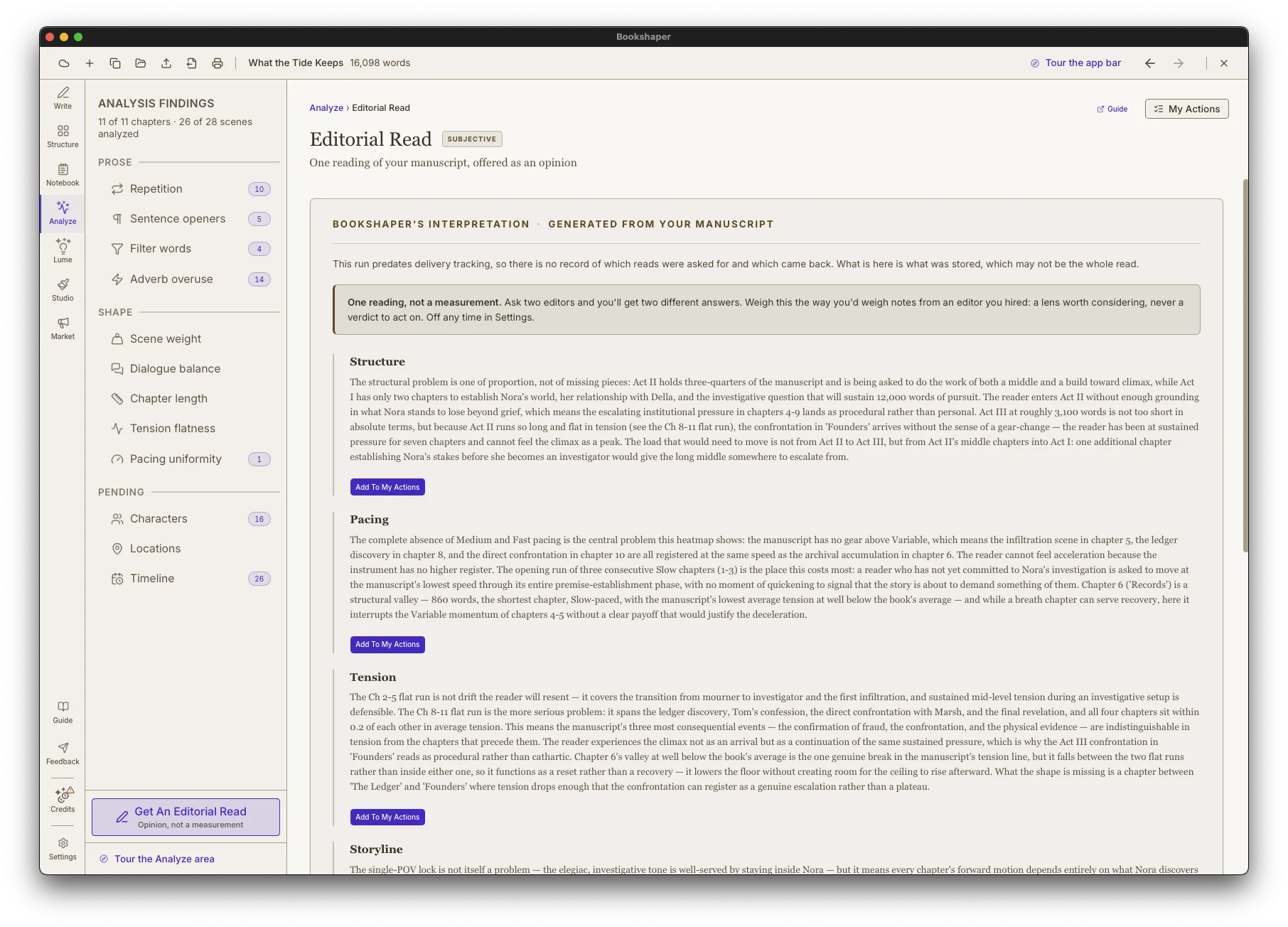
Labeled for what it is
The Editor's Letter is marked as an opinion wherever it appears in the app. It is generated from your manuscript and never applied to it, and you can switch it off in Settings at any time.
What it costs
The Editor's Letter is written by the same run that analyzes your manuscript, priced by the manuscript's size, and shown in the cost before you start. It is rewritten when a later run changes the analysis, so run it after a full revision pass rather than after every edit. The free trial includes credits to try it, and a license comes with 300 starter credits.
The short version
A critique of your whole manuscript in prose rather than charts: what is working, what is not, and where, across structure, pacing, tension, storyline and craft. It reads like the letter a developmental editor sends after a first read.
No. Nothing is applied to the manuscript. When a point is worth acting on, add it to My Actions, your revision list, and make the change yourself.
It is one reading, offered as an opinion. Ask two editors and you will get two different answers. Weigh it the way you would weigh notes from an editor you hired: a lens worth considering, never a verdict.
Open Revise, go to the Overview in Develop's Story Analysis group, and click Run Story Analysis. The run analyzes your manuscript and writes the letter from it. You see the credit cost before the run starts.
It is priced by the size of your manuscript, and the cost is shown before the run starts. The free trial includes credits to try it.
Yes. Print it or save it as a PDF from the print dialog. If you do not want an opinion at all, switch the Editor's Letter off in Settings › AI Configuration › AI features and it disappears from Revise.
$29.99 one-time at launch pricing, through December 31, 2026, for Windows, macOS and Linux on one license, with 300 starter credits.
7 days of actual use, not 7 calendar days. Buy once when you are ready; one license covers Windows, macOS, and Linux.